

One Mile Jam blogs:

Posts Tagged ‘software’

Wybron’s CXI-IT Color Calculator for the iPhone

Monday, September 29th, 2008

CXI-IT by Wybron Color fader users, attention:  Wybron has an iPhone program that is made to correctly calculate the percentages for their CXI-IT color fader - you know, the one with two CMY rolls that mixes 432 “distinct” colors.  It’s also the fader that has the photometric sensor to detect if the lamp’s on, heat sensors, and all the bells and whistles that come with Wybron’s InfoTrace system - the remote device management system Wybron wrote.

Ok, enough of that - this post is about their CXI calculator for the iPhone and iPod.  Wybron’s CXI Calculator gives you the ability to mix the two CMY strongs together and find the specific colors you want to create.  From Wybron’s website:

Mix the perfect color for your CXI IT dual-gelstring color changer with Wybron’s CXI Color Calculator for the iPhone and iPod touch.

Using the Color Calculator’s simple interface, scroll through two overlapping gelstrings of cyan, magenta, and yellow to find the perfect color out of nearly 500 different shades. Then plug its numerical values – either decimals or percentages – into your control console to create the color on stage.

Or find the values necessary to replicate popular GAM, Lee, and Rosco gels.

The Color Calculator replaces the plastic color wheel lighting pros have carried since the CXI came into existence in 1998. But now, with all that information on your iPhone or iPod, you can fit a wealth of knowledge in your pocket.

And the devices’ illuminated screens let you mix and match colors even in the darkest theater.

The Color Calculator runs on any iPhone and iPod touch and can be purchased through Apple’s App Store. Just click on the App Store icon from the main screen of each device, or access the App Store through iTunes.

You can get this program either from the iTunes Store or by clicking the direct link here.

CXI Calc

What’s Your Drafting Poison?

Monday, September 15th, 2008

We all have our choices in drafting software, and there’s three main platforms out there with several smaller companies making programs.  What’s your poison?  I’m a WYSIWYG man myself, with AutoCAD being my goto 3D platform..  But I also know Vectorworks too.  So - what do you use?  Post in the comments, I’d love to hear your preferences.  Also, if you draft by hand (and many do) tell us!

iSwitch for iPhone, by Mike Zinman!

Monday, August 18th, 2008

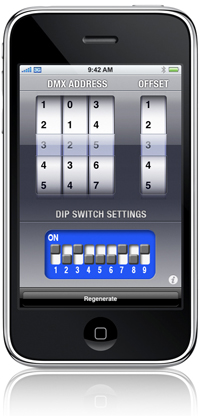
If you’re an AutoCAD user, then you remember AutoBlock for AutoCAD - the lighting block tool that pretty much all of us AutoCAD users used back in the day.  Mike’s come up with a great new iPhone app for we lighting designers and technicians - the iSwitch DMX dip switch calculator for iPhone!

The official press release:

iSwitch DMX iPHONE APP RELEASED

Michael Zinman, developer of the successful AutoBLOCK 2000, software for AutoCAD, has released iSwitch DMX for the iPhone or iPod touch. This is an easy-to-use calculator for addressing DMX devices and generating a graphical Dip Switch Layout.

Entering any number between 1-512 generates a graphical dip-switch layout in real-time.
Includes an offset picker and Regenerate button to quickly generate the next DMX Address and dip-switch layout for that address.

iSwitch DMX can be purchased directly though iTunes via the App Store under Utilities for $4.99. Follow this link to go directly to the iSwitch DMX site on iTunes:
http://phobos.apple.com/WebObjects/MZStore.woa/wa/viewSoftware?id=286911472&mt=8.

For more information, or to watch a video of this app, visit the website at http://www.lightingiphoneapps.com.

Go support the maker of AutoBlock! It’s $4.99!